
Download Paragraph Generator – Free AI Writing Tool, Instant Paragraph Creation
Overview: What Is Paragraph Generator and Who Can Benefit?
The Paragraph Generator is a web‑based AI writing assistant that creates unique, ready‑to‑use paragraphs on demand. Powered by the lightweight Phi‑3 model that runs entirely in the browser, the tool requires no registration, stores no personal data, and delivers results in seconds. Whether you are a blogger juggling multiple posts, a student drafting essays, a marketer crafting ad copy, or a developer needing placeholder text, this free utility adapts to any niche by accepting a topic or keyword and returning a polished paragraph that matches the tone you select.
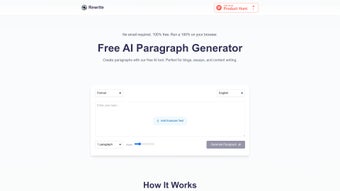
Because the AI executes locally, you enjoy a secure, privacy‑first experience while still benefiting from cutting‑edge language generation. The interface is deliberately simple: type your prompt, pick a style (formal, casual, persuasive, etc.), hit “Generate,” and instantly copy the output. No hidden fees, no subscription, and no usage limits make Paragraph Generator an attractive alternative to cloud‑based services that often impose throttling or data‑retention policies.
In short, it is a lightweight, privacy‑focused solution for anyone who needs high‑quality text fast, without the overhead of installing heavy desktop software.
Key Features, Browser Compatibility, and How to Get Started
- Instant paragraph generation powered by Phi‑3 AI running locally in the browser.
- Zero‑registration workflow – start writing without creating an account.
- Full privacy: no data is sent to external servers, and nothing is stored after the session.
- Customizable tone and style (formal, casual, academic, marketing, etc.).
- One‑click copy to clipboard for immediate reuse.
- Supports modern Chromium‑based browsers for optimal performance.
- Free for personal, academic, and commercial use with no usage caps.
- Future roadmap includes a Chrome extension and standalone desktop app.
The application is designed for Windows, macOS, Linux, Android, and iOS users who access it through a compatible web browser. For the best experience, use the latest version of Chrome, Edge, or any Chromium‑based browser; older browsers may lack the WebAssembly support required for the Phi‑3 model.
Installation & Usage Instructions
- Navigate to the official Paragraph Generator website (the URL is typically
https://paragraph-generator.ai). - Enter the keyword or short description of the topic you need a paragraph about.
- Select the desired tone from the dropdown menu (e.g., “Professional,” “Conversational,” “Technical”).
- Click the “Generate” button. The AI processes the request locally and displays the paragraph within 2‑5 seconds.
- Use the “Copy” button to transfer the text to your clipboard, then paste it into your document, blog editor, or LMS.
- If the output needs tweaking, adjust the prompt or tone and regenerate – there’s no limit to the number of attempts.
Because the tool runs entirely in the browser, there is no download or installation step beyond opening the web page. Users on mobile devices can enjoy the same workflow, provided they have a modern browser installed. If you wish to stay ahead of the upcoming Chrome extension, simply join the waiting list by entering your email at the bottom of the homepage; you will receive an invitation once the extension is released.
Pros, Cons, and Real‑World Performance Insights
Pros
- Free and unlimited: No hidden fees, subscription, or request caps.
- Privacy‑first: All processing happens locally; no data leaves the user’s device.
- Instant results: Paragraphs are generated in a few seconds, even on modest hardware.
- Customizable tone: Tailor output to fit academic, marketing, or casual contexts.
- Cross‑platform: Works on any device with a Chromium‑based browser.
- Future‑ready roadmap: Planned Chrome extension and desktop app will broaden use cases.
Cons
- Browser dependence: Requires a modern Chromium browser; older or non‑Chromium browsers may not support the AI engine.
- Limited to paragraph length: The tool focuses on single paragraphs; longer articles need multiple generations.
- No built‑in plagiarism checker: Users must verify originality separately.
- Feature set is basic: Advanced formatting, citations, or keyword density controls are not yet available.
- Beta‑stage stability: As a relatively new service, occasional UI glitches may occur.
Frequently Asked Questions & Final Verdict
Is Paragraph Generator really free?
Yes. The core web tool is completely free with no hidden subscription fees or usage limits. Future extensions may offer premium features, but the basic paragraph generator will remain free.
Does the tool store my prompts or generated text?
No. All processing occurs locally in your browser, and no data is transmitted to external servers. Once you close the page, the session data is cleared.
Which browsers are supported?
The generator works best on Chromium‑based browsers such as Google Chrome, Microsoft Edge, and Brave. Safari and older browsers may experience compatibility issues because they lack the necessary WebAssembly support.
Can I use the generated paragraphs for commercial projects?
Absolutely. The license permits personal, academic, and commercial use with no restrictions, as long as you comply with local laws and do not claim the AI‑generated text as your own original work without verification.
When will the Chrome extension and standalone app be available?
A waiting list is currently open on the website. The development team aims to release the Chrome extension and a desktop version within the next 3‑6 months, based on user interest and feedback.
Conclusion & Call to Action
Paragraph Generator stands out in a crowded AI‑writing market by delivering a secure, zero‑cost solution that respects user privacy while providing instant, high‑quality paragraphs. Its local‑only architecture eliminates the data‑privacy concerns that plague many cloud‑based generators, and the lack of registration lowers the entry barrier for anyone needing quick content. While the current feature set focuses on single‑paragraph output, the roadmap promises extensions that will broaden its utility for longer‑form writing and workflow integration.
If you need a reliable, fast, and free tool to jump‑start blog posts, essays, or marketing copy, give Paragraph Generator a try today. Simply visit the site, type your prompt, and start copying polished text in seconds. For power users, join the waiting list for the upcoming Chrome extension to embed the generator directly into your browsing experience.
Download Paragraph Generator now and experience the future of on‑the‑fly writing.



.png)



